
PlantFlow 3D › Simulators › 3D Electrical Wiring Simulator for control panels
3D Electrical Wiring Simulator for control panels
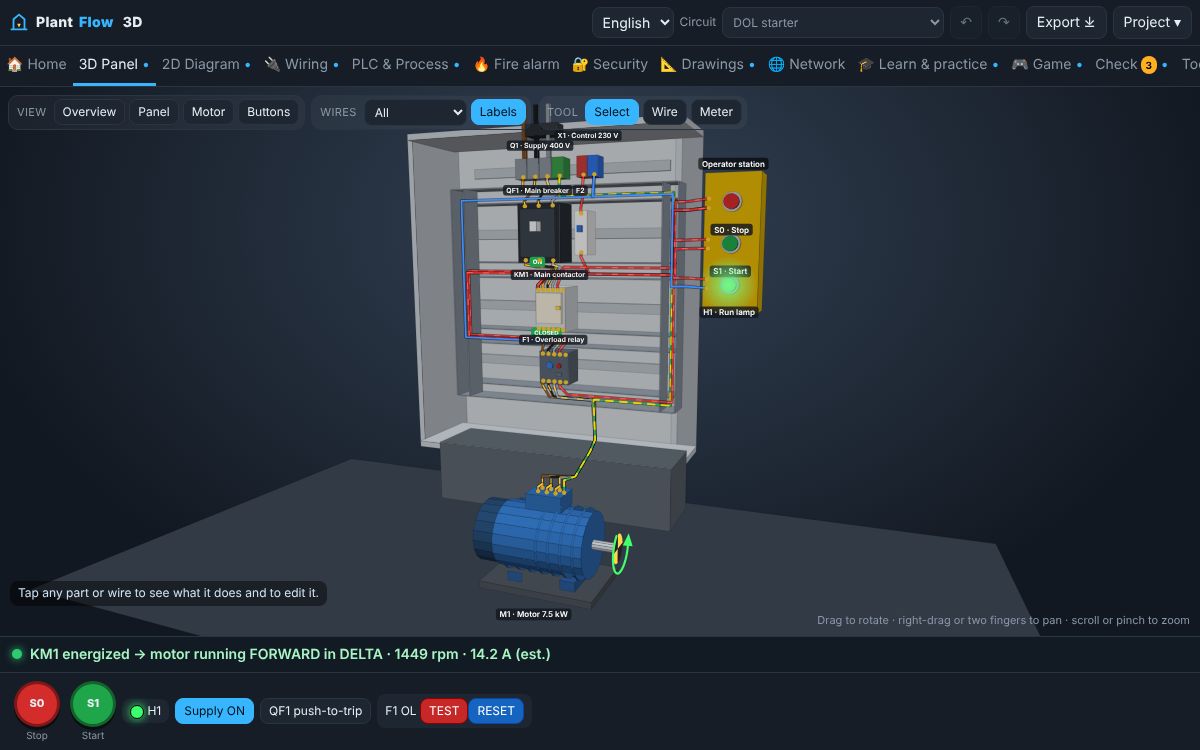
Free 3D electrical wiring simulator: contactors, overload relays and the motor in a 3D panel, with a realistic wiring view and live current flow.
▶ Open this simulator ⬇ Download the app
What it is
PlantFlow 3D shows the same circuit in three ways: a 3D panel you can rotate, a 2D schematic and a realistic mounting-plate wiring view with ferrule numbers on both ends of every wire. Current flow is animated from the actual simulation, not a decorative effect.
What you can do
- Rotate and zoom the 3D panel; tap any part to read its name and state.
- Step-by-step wiring player: earth first, then power, then control.
- Wire numbers follow the equipotential rule: same potential, same number.
- Real AC view: the three phases peak 120° apart.
- Rebuild an existing panel from an Excel wire list or a typed survey (reverse engineering).
How to use it
- Open the 3D panel with the button below.
- Press START on the operator station.
- Switch to the Wiring tab and turn on Amps and Real AC.
- Use ▶ Wire step by step to see the wiring order.
Learn the theory
- Electrical wire colours and wire numbering in control panels
- Contactor terminals explained: 1-2, 3-4, 5-6, A1-A2, 13-14 and 21-22
- How a DOL motor starter works
- Emergency stop circuits: how an E-stop should be wired
Questions
Do I need a powerful computer for 3D?
No. The 3D view is lightweight and phones open in the 2D view by default; 3D is optional.
Can I export the wiring schedule?
Yes, the Export menu creates an Excel workbook with the equipment list and the wiring schedule.
Safety: this guide explains principles for learning. Real installations must follow the applicable codes, the equipment manufacturer's instructions and the approval of a competent, qualified person. Isolate, lock off and prove dead before touching any circuit.