
PlantFlow 3D › Simulators › Electrical Fault-Finding Practice with a Virtual Multimeter
Electrical Fault-Finding Practice with a Virtual Multimeter
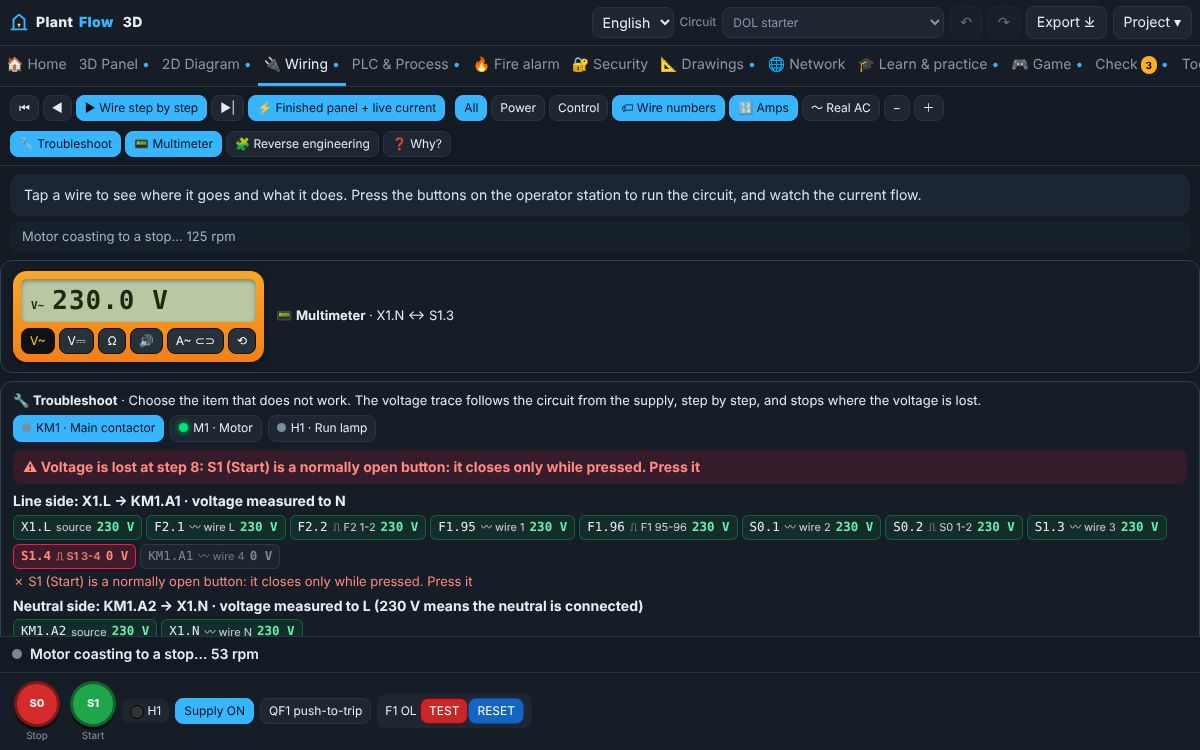
Practise electrical troubleshooting online: hidden faults in motor circuits, a virtual multimeter with continuity buzzer and a voltage trace.
▶ Open this simulator ⬇ Download the app
What it is
Good fault-finding follows a method: symptom, visual check, live voltage test from the supply towards the load, then isolation and dead testing. PlantFlow 3D hides real faults in the modelled circuit (broken wires, open coils, stuck contacts, lost phases, tripped overloads) so the readings you take are the readings a technician would get.
What you can do
- A digital multimeter with AC/DC volts, ohms, continuity buzzer and a clamp meter with power reading.
- A LIVE warning when you try a continuity test on an energised circuit.
- A voltage trace that follows the circuit step by step and highlights where the voltage is lost.
- Three-fault practical lesson with a score and a certificate of completion.
How to use it
- Open the fault-finding lesson with the button below.
- Read the symptom and operate the circuit.
- Measure with the multimeter: tap two terminal screws in the Wiring view.
- Name the faulty item; hints reduce the score.
Learn the theory
- Troubleshooting a motor control circuit step by step
- How to use a multimeter: voltage, continuity and resistance
- Electrical wire colours and wire numbering in control panels
- Overload relay contacts 95-96 and 97-98: test, reset and setting
Questions
Are the faults random?
The fault is chosen at random from a list, but its effect comes from the modelled circuit, so every reading is consistent with the fault.
Can I practise safe isolation?
Yes. The basics lesson asks you to switch off and prove the circuit dead before testing continuity.
Safety: this guide explains principles for learning. Real installations must follow the applicable codes, the equipment manufacturer's instructions and the approval of a competent, qualified person. Isolate, lock off and prove dead before touching any circuit.